


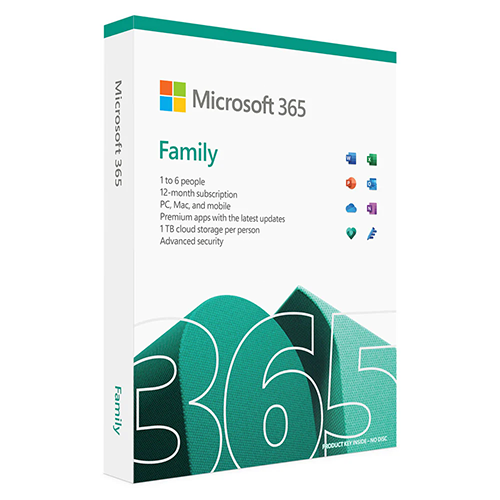
Microsoft 365 Family (6 PC or Mac User / 12-Month Subscription)
KSh 14,999.00
Product Highlights
- For 1 to 6 people.
- Each person can use on up to 5 devices (PC, Mac, iPhone, iPad, Android).
- 1 TB cloud storage (1 TB per person).
- Productivity apps with Microsoft Copilot.
- Designer: AI-powered image creator/editor.
- Clipchamp: Video editor with premium filters/effects.
- Microsoft Defender: Advanced security for data and devices.
- OneDrive: Ransomware protection for files.
- Ongoing support included.
A Microsoft 365 Family subscription lets you create family calendars, share photos on OneDrive, and connect on Microsoft Teams. It also includes AI-powered features like Copilot in Word, Excel, PowerPoint, Outlook, and Designer, offering assistance with tasks such as summarizing an email discussion with your family, creating invitations for your child’s birthday party, and planning your next vacation.
Microsoft Office 365 Family is a subscription plan offered by Microsoft that provides access to a suite of productivity tools and services for multiple users. Here are some key features and details about Microsoft Office 365 Family:
Key Features:
- Multiple User Accounts:
- Allows up to 6 users to share the subscription.
- Each user gets their own Microsoft account with personalized settings and storage.
- Office Applications:
- Access to premium versions of Microsoft Office applications, including Word, Excel, PowerPoint, Outlook, OneNote, and Access (PC only).
- Available on multiple devices, including PCs, Macs, tablets, and smartphones.
- Cloud Storage:
- Each user gets 1 TB (terabyte) of OneDrive cloud storage, totaling 6 TB for the family.
- Secure cloud storage for documents, photos, and other files.
- Advanced Security Features:
- Includes advanced security features like ransomware detection and recovery, personal vault, and password-protected sharing links.
- Microsoft Teams:
- Access to Microsoft Teams for family communication and collaboration.
- Video calls, chat, and file sharing within the family group.
- Outlook.com Premium:
- Ad-free email experience with enhanced security features.
- Custom email domain support.
- Family Safety:
- Microsoft Family Safety app for managing screen time, app and game usage, and location sharing.
- Skype Minutes:
- Includes 60 minutes of Skype calling to mobile phones and landlines per month.
Subscription Details:
- Price: The subscription is typically offered on an annual or monthly basis. The annual subscription is often more cost-effective.
- Platforms: Compatible with Windows, macOS, iOS, and Android.
- Updates: Subscribers receive regular updates and new features for the Office applications.
Benefits:
- Cost-Effective: Sharing the subscription among up to 6 users makes it a cost-effective solution for families.
- Flexibility: Use the applications and services on multiple devices.
- Collaboration: Enhanced collaboration tools for both personal and family projects.
How to Get Started:
- Purchase: Buy the subscription from the official Microsoft website or authorized retailers.
- Sign In: Use your Microsoft account to sign in and set up the subscription.
- Install: Download and install the Office applications on your devices.
- Share: Invite family members to join the subscription using their Microsoft accounts.
Microsoft 365 Family is a comprehensive solution for families looking to enhance their productivity, communication, and data security.
Buy at the Best Price Online from Camera Stuff Kenya, Nairobi
Discover the best deals on cameras and photography gear at Camera Stuff Kenya, Nairobi. Shop online for top-quality products at unbeatable prices and enjoy fast, reliable delivery across Kenya. Elevate your photography game today—order now!
| Brands |
|---|
| Delivery Format | |
| License Type | |
| User Support | |
| System Compatibility/Requirements |
| Package Weight | |
| Box Dimensions (LxWxH) |
Based on 0 reviews
Only logged in customers who have purchased this product may leave a review.
Related products
-
-
Camera Stuff Kenya
XO PD Type C to Type C USB Cable
Product Highlights
- Line length: 200mm, weight: 11g
- Outer material: 100A TPE material
- Joint material: 85A TPE rubber
- Function: Support charging and data transfer
- Line length: 200mm, weight: 11g
- Outer material: 100A TPE material
- Joint material: 85A TPE rubber
- Function: Support charging and data transfer – Type-C to Type-C
Connect and charge your USB Type-C-enabled phones, tablets, and other devices with the USB Type-C To USB Type-C Cable. Capable of data transfer rates up to 5 Gb/s and power delivery up to 60W, this male-to-male cable is compatible with USB 3.1 Gen 1 standards. An embedded E-marker chip is designed to determine the maximum data rates and power needs of your devices, while also providing overvoltage, overcurrent, and overtemperature protection. This USB-IF-certified USB Type-C cable is compatible with most USB Type-C.
SKU: n/a -
Mobile, Smartphone Accessories, Camera Stuff Kenya
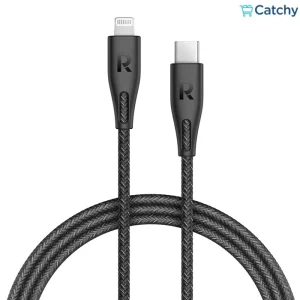
USB-C To Lightning Cable 1.2M
Product Highlights
- High-Speed Data Transfer data between devices in seconds
- MFi Certified Works smoothly with any of your Apple devices
- Recharge Faster Supports Max 2.4A/12V output for super high-speed charging
- Extraordinary Durability based on internal testing results for 100,000+ bend tests
- Universal Compatibility Works flawlessly with any lightning port enabled devices
It has a sturdy and flexible design that makes it perfect for daily use and travel, allowing you to easily carry it without worrying about damage. The cable comes with a detachable and corrosion-resistant cover to ensure its long-term quality and performance. Thanks to fast charging technology and universal compatibility, you can rely on this cable to efficiently charge a variety of devices with high efficiency and super speed. The cable length is 1.2 meters and made of braided nylon threads for greater durability.
SKU: n/a


























































&url=https://camerastuffkenya.com/product/microsoft-office-365-family/&media=https://camerastuffkenya.com/wp-content/uploads/2025/03/microsoft_365_family.png)


There are no reviews yet.